


 02:25
02:25
 Unknown

Are you used to using Google as a way around the Wall Street Journal’s paywall? Think again. The WSJ has been holding back stories available through Google’s “First Click Free” program, a move that I suspect other newspapers might soon emulate.
Over the past few weeks, I’ve noticed that I wasn’t able to read some Wall Street Journal stories when visiting from Google. I figured this was some type of bug. But a recent case got me digging deeper: the Journal’s story about how Google created a workaround past Safari’s default privacy settings as a way of enabling +1 buttons on Google’s ads.
I was unable to read the full story after finding it listed in search results at Google, either in regular Google web search listings or in Google News. Instead, I was shown only a short summary with a prompt to subscribe or log-in. That shouldn’t have been the case, given that the WSJ participates in the First Click Free program, which I’ll explain in more depth below.
“Google FCF [First Click Free] is a way to introduce our content to new readers and broaden our audience. As a strategy, we hold back a few of our top stories by not having the full story crawled, which limits select articles from being available via FCF. We have been doing this since last summer as a strategy to encourage subscriptions,” emailed Ashley S. Huston, Vice President, Corporate Communications, for the Wall Street Journal, when I asked about the situation.
To be in First Click Free, Google requires that anyone coming to those articles from a Google search be allowed to read the entire article, without having to register or pay. This helps reduce people who get upset with Google for listing content that they can’t easily view.
If the person tries to click from the article they found via search to another article, then a barrier is allowed to go up. They get the first click from Google for free, hence the “First Click Free” name. All subsequent clicks can be blocked unless they’ve registered or paid.
What prevents someone from finding the articles they want, then searching for them and repeatedly using First Click Free to bypass barriers? Google does allow limitations. People must be allowed up to five free clicks per day, the rules say. Then they can be limited.
That five free clicks per day rule, by the way, is why the New York Times limits visitors from search engines to that amount even though oddly, it allows anyone from social media sites to have as many reads as they want. My article from last year, The Leaky New York Times Paywall & How Google Limits Led To Search Engine Limits, explains more about this.
In the case of the WSJ’s Google-Safari privacy article, unless you paid, you simply were not going to read it. It was an effective strategy. My WSJ subscription had lapsed about two weeks before the article came out. I was waiting for the inevitable renewal offer for around $150 per year for home delivery and web access. But I wanted to read that story so much that day that I renewed at the $260 list price.
Today, by the way, the article is available for free. That’s even more cleverness on the part of the WSJ. Now that it has become dated, along with being widely cited and excerpted, there’s probably more value in making it completely open for anyone to read (and likely link to), as a way of building traffic that earns ad revenue, rather than subscription revenue.
Here’s another example of the selective withholding in action. Consider this WSJ story that’s listed in Google:


Heck, I’ve found Google had a tough-enough time displaying subscription-only labels in the past. But beyond the WSJ, life is getting even more complicated.
Consider that “subscription-only” Newsday actually gives five free visits per month to anyone:


Over the past few weeks, I’ve noticed that I wasn’t able to read some Wall Street Journal stories when visiting from Google. I figured this was some type of bug. But a recent case got me digging deeper: the Journal’s story about how Google created a workaround past Safari’s default privacy settings as a way of enabling +1 buttons on Google’s ads.
I was unable to read the full story after finding it listed in search results at Google, either in regular Google web search listings or in Google News. Instead, I was shown only a short summary with a prompt to subscribe or log-in. That shouldn’t have been the case, given that the WSJ participates in the First Click Free program, which I’ll explain in more depth below.
WSJ: Not Everything Included In First Click Free
As it turns out, the Journal has been keeping some stories out of First Click Free for over half-a-year.“Google FCF [First Click Free] is a way to introduce our content to new readers and broaden our audience. As a strategy, we hold back a few of our top stories by not having the full story crawled, which limits select articles from being available via FCF. We have been doing this since last summer as a strategy to encourage subscriptions,” emailed Ashley S. Huston, Vice President, Corporate Communications, for the Wall Street Journal, when I asked about the situation.
What Is First Click Free?
The Wall Street Journal, like many newspapers with registration requirements or paywalls, participates in Google’s First Click Free program. That program allows publications to provide the full-text of articles to Google that are normally kept behind some type of barrier. This means Google can better understand what a story is about, which in turn means it might have more visibility in Google, generating more traffic for the publication.To be in First Click Free, Google requires that anyone coming to those articles from a Google search be allowed to read the entire article, without having to register or pay. This helps reduce people who get upset with Google for listing content that they can’t easily view.
If the person tries to click from the article they found via search to another article, then a barrier is allowed to go up. They get the first click from Google for free, hence the “First Click Free” name. All subsequent clicks can be blocked unless they’ve registered or paid.
What prevents someone from finding the articles they want, then searching for them and repeatedly using First Click Free to bypass barriers? Google does allow limitations. People must be allowed up to five free clicks per day, the rules say. Then they can be limited.
That five free clicks per day rule, by the way, is why the New York Times limits visitors from search engines to that amount even though oddly, it allows anyone from social media sites to have as many reads as they want. My article from last year, The Leaky New York Times Paywall & How Google Limits Led To Search Engine Limits, explains more about this.
WSJ Goes Hybrid: First Click Free & Subscription Required
First Click Free has typically been an all-or-nothing implementation by newspapers. They’ve either made all their content available through the program (such as the New York Times does) or none of it (such as The Times does). The WSJ is pioneering a hybrid model. Some content is offered through First Click Free. Some isn’t at all.In the case of the WSJ’s Google-Safari privacy article, unless you paid, you simply were not going to read it. It was an effective strategy. My WSJ subscription had lapsed about two weeks before the article came out. I was waiting for the inevitable renewal offer for around $150 per year for home delivery and web access. But I wanted to read that story so much that day that I renewed at the $260 list price.
Today, by the way, the article is available for free. That’s even more cleverness on the part of the WSJ. Now that it has become dated, along with being widely cited and excerpted, there’s probably more value in making it completely open for anyone to read (and likely link to), as a way of building traffic that earns ad revenue, rather than subscription revenue.
Here’s another example of the selective withholding in action. Consider this WSJ story that’s listed in Google:
If I click on that story from Google to the WSJ, I get a barrier — so it’s being withheld from First Click Free:
Is It Cloaking?
At this point, some search marketers and others technically savvy about how Google works might be wondering if the WSJ is cloaking, a huge no-no with Google.
Cloaking means that you show Google something different than you show human visitors. Google dislikes this. It wants to see exactly what a human visitor to a site would see, lest the site somehow try to trick Google (say showing content that says a page is about one thing, when it’s about something else).
The problem here is that what a human visitor sees will depend on whether they have a WSJ subscription or not. Those who do see the full article. Those who don’t see only a summary.
In cases like this, the fallback to determine if cloaking is happening is usually whether a publication is doing something special for Google that it wouldn’t do for humans. On that basis, the WSJ seems fine.
No, Not Cloaking
For this particular article, the WSJ is doing nothing out-of-the-ordinary for Google than it would do for any other visitor who doesn’t have a subscription. Only a summary article is shown to Google, as the cached version reflects:
Oddly, somehow Google is seeing the full-article for the page snapshot (Google Instant Preview) it makes that leads to the cached copy, when you hover your mouse to the right of the listing:
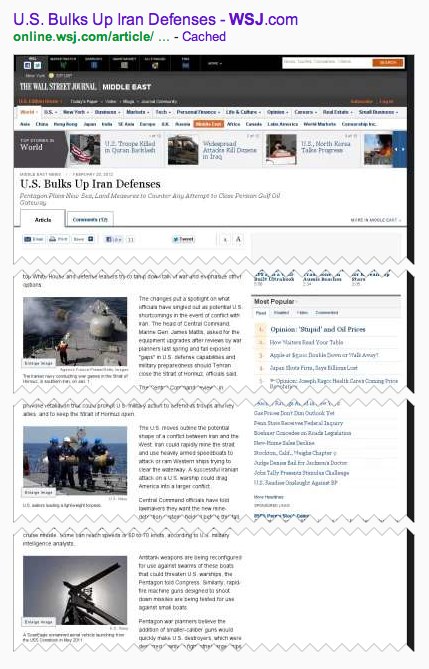
Overall, the Journal seems to have found an interesting way to have its Google cake and eat it, too. It gets to participate in First Click Free, which allows the full-text of its articles to be recorded by Google (full-text articles are more likely to rank for a wider-range of searches than summaries). That means traffic that helps drive ad revenues.
It also gets to withhold the full-text of some key articles, which still likely get plenty of traffic via Google even though only summary articles are shown. However, by being selective in this way, it helps increase subscriptions.
What’s Subscription-Only Getting Confusing
The only issue the WSJ really faces is that potentially, Google might decide that it’s time to change the rules to disallow this type of selective withholding.
Technically, withholding articles as the WSJ does is making them subscription-only content, which should require Google to insert a “Subscription” notation next to the article. Google does this because, as you can imagine, it’s annoying for searchers who are used to going from Google News to the full-text of articles only to get a registration barrier.
Google isn’t currently tagging any of this withheld content from the WSJ as subscription-content, as it should. That’s probably the case because it doesn’t know how. Typically, as I explained, sites are either entirely subscription-only or First Click Free. Google probably needs to figure out a way to deal with a hybrid situation like this.Heck, I’ve found Google had a tough-enough time displaying subscription-only labels in the past. But beyond the WSJ, life is getting even more complicated.
Consider that “subscription-only” Newsday actually gives five free visits per month to anyone:
So is it a subscription site or not? Google doesn’t label it that way, even though you can clearly see the content that Google is indexing is the non-subscriber material:
Meanwhile, The Times supposedly gives no free clicks:
Yet clearly, The Times is also letting Google have full-access to some articles:
Since the site advertises itself as subscription-only, should those stories have a “subscription” tag next to them? Or since they are available to anyone, should they not carry this, as is currently the case?
I’ll be following-up with Google more about this. I did talk with the company initially, but it didn’t provide any official comment on the WSJ’s experimenting, other than it was something Google typically had not seen.


